
Last Friday, we had the opportunity to hear from Justin Weisz, Stephanie Houde, Steven Ross, and the IBM team about their research on controlling AI agent participation in group conversations. They ran a set of studies with a Slack bot called Koala to understand how an agent should behave in live multiparty brainstorming sessions. Read on for what they found. Their results are important for how we think about designing agents in collaborative spaces like Teams.
Koala
They built an LLM based conversational-agent prototype called Koala for Slack as a bot.

They ran two studies with Koala to measure its impact on brainstorming, using the findings from Study 1 to refine and evolve the agent for Study 2.
Study Setup
- Same groups tested across:
- No AI
- Koala Reactive (responds when addressed) via mention
- Koala Proactive (decides when to speak)
- Tasks: 3-min brainstorming -> pick top 3 ideas.

High-level Findings
- Everyone preferred having Koala over no AI
- Shows everyone appreciated having an agent while brainstorming
- Strong preference for Reactive over Proactive in v1.
- Koala contributed 73% of all ideas; 33% of top ideas.
(Takeaway: AI boosted volume and quality.)

Advantages (from Study 1)
- Removes “white page” problem; helps groups start.
- Speeds up brainstorming.
- Adds structure; pseudo-moderator.
- Summaries keep the group on track.
- Validates user ideas.
- Fills knowledge gaps.
- Visible human-AI collaboration sparks more ideas.
Disadvantages (from Study 1)
- Proactive mode = distracting, intrusive, overwhelming.
- Too long, too frequent, wrong timing.
- “Dominated the conversation.”
- Stifling effect (“boxed myself in,” production blocking).
- Inaccurate / hallucinated summaries.
What Participants Wanted
- Control over when, how often, and how much Koala contributes.
- Ability to steer behavior mid-conversation.
- Combine reactive + selective proactive behaviors.
- Agent should wait when humans are actively typing.
- Option to ask permission before interjecting (“Want me to share top 3?”).
Koala II Improvements
- Model upgrade to Llama 3 led to fewer hallucinations, longer context.
- Prompt updates: more targeted suggestions, less domination.
- Tunable “value threshold” for proactivity.
- UI control panel:
- Reactive vs proactive toggle.
- Proactive contribution threshold (High / Medium / Low).
- Where messages appear: in-channel vs thread.
- Long-message truncation.

Basically, give users the option of choosing how Koala should interact, allow it be steered on how to respond via a message mid-conversation, and pre-built persona selection.
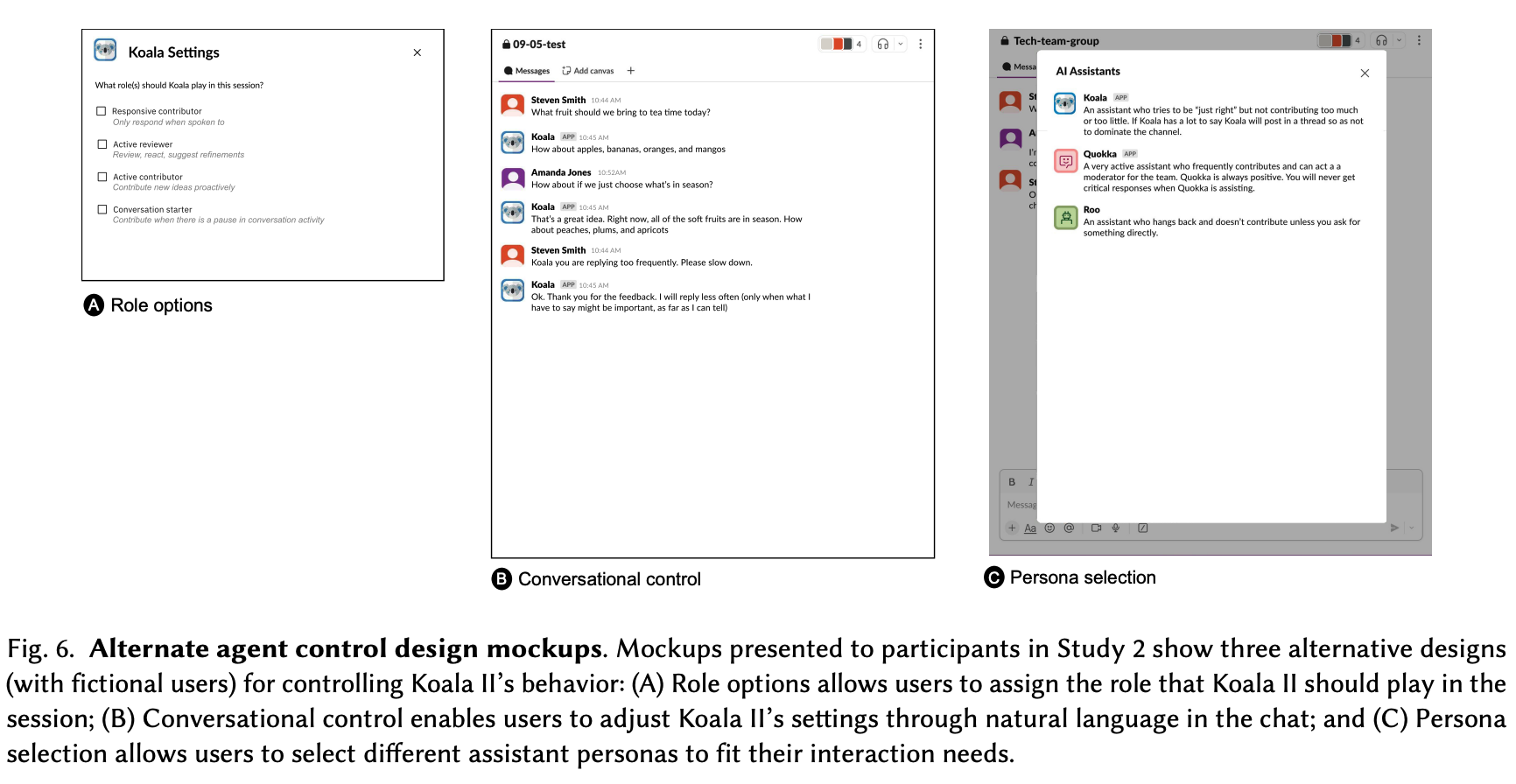
Study 2: Results
- Koala II perceived as quieter, better paced, more on-topic.
- Felt more natural and less interruptive.
- Big reversal:
- No group switched from Proactive to Reactive.
- When tuned, people preferred the improved Proactive version.
- Threaded replies were a failed expectation (this surprised me initially, but makes sense):
- People thought it would reduce noise, but it worsened collaboration.
- Tone complaints: Koala II occasionally too human (“That’s a great idea!”).
Three groups tried the option of having Koala II respond in thread rather than in channel, thinking it would reduce their distraction from Koala II. Surprisingly, it had the opposite effect. P1.1 explained how it took time to “look through everyone’s threads… taking away from our collaboration.” Many other participants made similar comments, suggesting that threaded replies may not be suited to the real-time nature of a brainstorming task.
User Control Insights (Study 2)
- Controls rated highly useful (avg 4.46/5).
- People want to change settings dynamically during the session.
- Different tasks → different proactivity levels.
- Natural-language steering is attractive but risky (misinterpretation, pollutes conversation).
- Roles and personas were preferred as high-level modes, but users still want low-level knobs.
Social + Governance Findings
- Adjusting AI settings inside a group is socially sensitive:
- Users felt “intrusive” making unilateral changes.
- But small teams were more accepting.
- Possible needs:
- Admin roles
- Voting on behavioral changes
- Visibility of changes
Taxonomy of Control (Paper’s Main Contribution)
- When the agent contributes
- Triggers (all messages, direct address, silence, bursts of activity).
- Filters (value threshold, relevance).
- Rate (delay, pacing, matching human cadence).
- What the agent contributes
- Content type (conservative vs wild ideas).
- Style (tone, length, enthusiasm, formatting).
- Modality (text, emojis, images, etc.).
- Where the agent contributes
- In channel vs thread.
- Future: other UI surfaces depending on context.
- How behaviors are specified
- UI controls.
- Natural language steering.
- High-level roles.
- Personas.
- Granularity control (coarse vs fine).
- Who can change the settings
- Permissions, visibility rules, group norms.
- Implementation
- Prompt engineering.
- External logic (needed because LLM self-regulation is unreliable).
- Real-time control mechanisms, not static presets.

Key Design Insight
- Proactivity is not binary. It is multi-dimensional and must be dynamically adjustable by the group.
- No single “best” setting; ideal behavior depends on:
- group preferences
- moment-to-moment context
- stage of collaboration
Going forward, explore next..
- Personalized AI behavior in collaborative settings.
- Context-aware proactivity (detect active human exchange, detect pauses).
- Allow different groups/situations to choose different behavior patterns.
- The right approach: a configurable system, not a fixed algorithm.
 Some Creativity
Leave a comment